Control Flow in JavaScript: If, Else, and Switch Explained
Self-taught Engineer | Disassembled my first PC at 16, been building ever since | Hardware fundamentals to software and coding| Obsessive learning | Built from scratch to scale
Imagine writing a program that just runs every line from top to bottom — no decisions, no conditions, no alternate paths.
That wouldn't be very useful. Because real life doesn't work in a straight line.
If it's raining, you carry an umbrella. If it's late, you skip breakfast. If your phone battery is low, you find a charger. Every action depends on a condition. Programming needs that same ability — the ability to look at a situation and decide what happens next.
That ability is called control flow.
Control flow decides the direction your program takes. Without it, your code just executes blindly. With it, your program starts making real decisions — just like we do every day.
The if Statement
Let's start very simple...
Imagine you want JavaScript to check whether someone is old enough to drive.
let age = 20;

if (age >= 16) {
  console.log("You can drive");
}
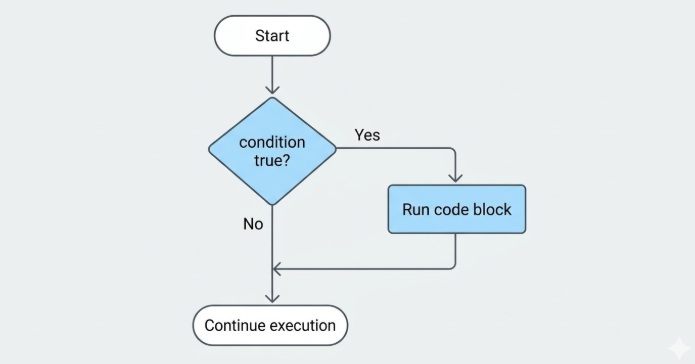
Here's how JavaScript reads this, step by step:
It looks at the condition inside the parentheses:
age >= 16That comparison returns either
trueorfalseIf it's
true, the code inside{}runsIf it's
false, JavaScript skips that block entirely
That's the if statement in a nutshell:
Run this block — but only if the condition is true.
The if-else Statement
What if the condition is false and you still want something to happen?
That's where else comes in.
let age = 14;

if (age >= 16) {
  console.log("You can drive");
} else {
  console.log("You're not old enough to drive");
}
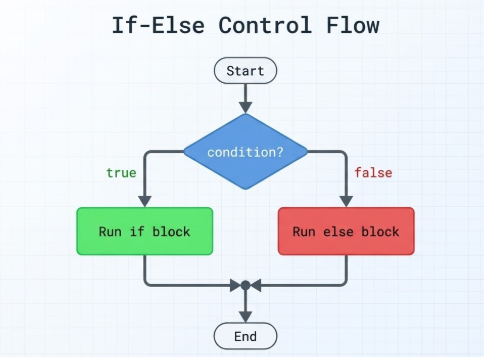
Now JavaScript has two clear paths:
Condition is
true→ first block runsCondition is
false→elseblock runs
One of them will always run. JavaScript evaluates the condition and picks a track. There's no skipping both.
The else if Ladder
Real life isn't always a yes or no situation. Sometimes there are multiple outcomes.
Say you're building a grade checker:
let marks = 78;

if (marks >= 90) {
  console.log("Grade A");
} else if (marks >= 70) {
  console.log("Grade B");
} else if (marks >= 50) {
  console.log("Grade C");
} else {
  console.log("Fail");
}
Here's the key thing to understand about how JavaScript reads this:
Is
marks >= 90? No. Move on.Is
marks >= 70? Yes. Run this block.Stop. Don't check anything else.
Once one condition becomes true, JavaScript exits the ladder immediately. It doesn't keep testing the rest.
This is why order matters. If you put marks >= 50 before marks >= 70, someone with 78 marks would get Grade C — because 78 >= 50 is true and JavaScript stops right there.
The switch Statement
Sometimes you're not checking ranges — you're checking exact values.
Let's say you're building a simple app where a user picks a plan:
let plan = 2;

switch (plan) {
  case 1:
    console.log("Basic Plan");
    break;
  case 2:
    console.log("Standard Plan");
    break;
  case 3:
    console.log("Premium Plan");
    break;
  default:
    console.log("Invalid plan selected");
}
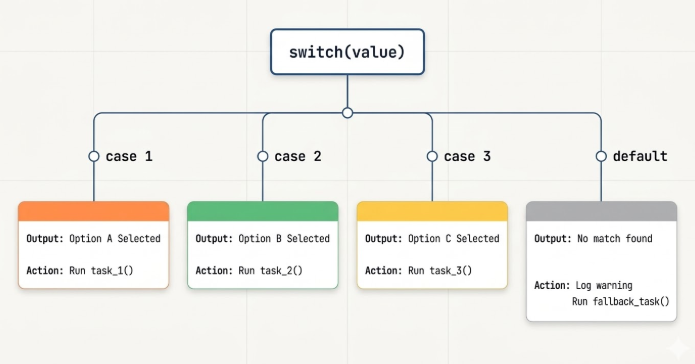
JavaScript walks through this like a checklist:
Does
planmatch1? No.Does it match
2? Yes. Run this block.Hit
break. Stop here.
The default at the end is the fallback — it runs if nothing else matches, similar to the final else in an if-else chain.
Why break Matters
Remove break from a switch case and something unexpected happens.
let plan = 2;

switch (plan) {
  case 2:
    console.log("Standard Plan");
  case 3:
    console.log("Premium Plan");
}
Output:
Standard Plan
Premium Plan
Both ran — even though plan was 2.
This is called fall-through. Without break, JavaScript doesn't stop at the matching case. It continues running every case below it until it hits a break or the switch ends.
Always add break unless you have a very specific reason not to.
if-else vs switch — When to Use Which
This is one of the most common questions beginners ask.
Both handle decisions. But they're built for different situations.
Use if-else when the logic involves comparisons
If you're checking ranges, conditions, or combining multiple checks — if-else is the right tool.
let temperature = 8;

if (temperature <= 10) {
  console.log("Wear a jacket");
} else if (temperature <= 25) {
  console.log("Comfortable weather");
} else {
  console.log("Stay hydrated");
}
You can't write temperature <= 10 cleanly inside a switch. It's built for exact matches, not ranges.
Also when your conditions get more complex:
if (age >= 18 && hasLicense === true) {
  console.log("You can drive");
}
This kind of combined logic belongs in if-else.
Use switch when you're matching exact values
If you have one variable and you're checking it against a list of fixed values — switch is cleaner and more readable.
let day = "Monday";

switch (day) {
  case "Monday":
    console.log("Start of the work week");
    break;
  case "Friday":
    console.log("Almost the weekend");
    break;
  case "Sunday":
    console.log("Rest day");
    break;
  default:
    console.log("Regular day");
}
Writing this with if-else would work — but it would look messier and harder to scan.
Quick rule to remember
| Situation | Use |
|---|---|
Comparing ranges (>, <, >=) |
if-else |
Combined conditions (&&, ` |
|
| Matching one variable to exact values | switch |
| Long list of fixed options | switch |
Think of if-else as a flexible thinker. Think of switch as an organized checklist. Both are powerful — you just pick based on the situation.
Assignment — try yourself
Part 1: Positive, Negative, or Zero
Before writing code, ask yourself: am I matching exact values or checking comparisons?
Here we're using > and < — so if-else is the right choice.
let number = -8;

if (number > 0) {
  console.log("Positive");
} else if (number < 0) {
  console.log("Negative");
} else {
  console.log("Zero");
}
Step through it with number = -8:
Is
-8 > 0? No. Skip.Is
-8 < 0? Yes. Print"Negative". Done.
Part 2: Day of the Week Using switch
Here we're matching a number to a fixed value — perfect for switch.
let day = 5;

switch (day) {
  case 1:
    console.log("Monday");
    break;
  case 2:
    console.log("Tuesday");
    break;
  case 3:
    console.log("Wednesday");
    break;
  case 4:
    console.log("Thursday");
    break;
  case 5:
    console.log("Friday");
    break;
  case 6:
    console.log("Saturday");
    break;
  case 7:
    console.log("Sunday");
    break;
  default:
    console.log("Invalid day number");
}
// Friday
Try removing a break and see what happens. Understanding fall-through by breaking things is far more effective than just reading about it.
Wrapping Up
Control flow is what makes your program feel like it's actually thinking.
Without it, code just follows instructions in order — no awareness, no judgment. With it, your program can evaluate a situation and respond differently based on what it finds.
The if statement runs a block when something is true. else gives you a fallback. else if handles multiple outcomes. switch cleans up exact value matching. These aren't just syntax rules to memorize. They're the tools that turn a list of instructions into something that makes decisions.


